
Notion Database Body Search Not Working? Fixes & AI Search Alternatives
Fix Notion database body search limitations. Learn fast shortcuts, workspace search filters, and how to query Notion alongside your internal company drives seamlessly.

-
Why doesn’t Notion always surface database page body content in search?
In many Notion database workflows, the native database search experience works best with visible properties such as tags, status, dates, and assignees. However, deep page body text, toggles, nested blocks, and embedded attachments may not always be surfaced as expected.
To search more deeply across page contents, teams typically use Workspace Search, in-page search, Notion AI Q&A, or an enterprise Work AI platform such as Wissly.
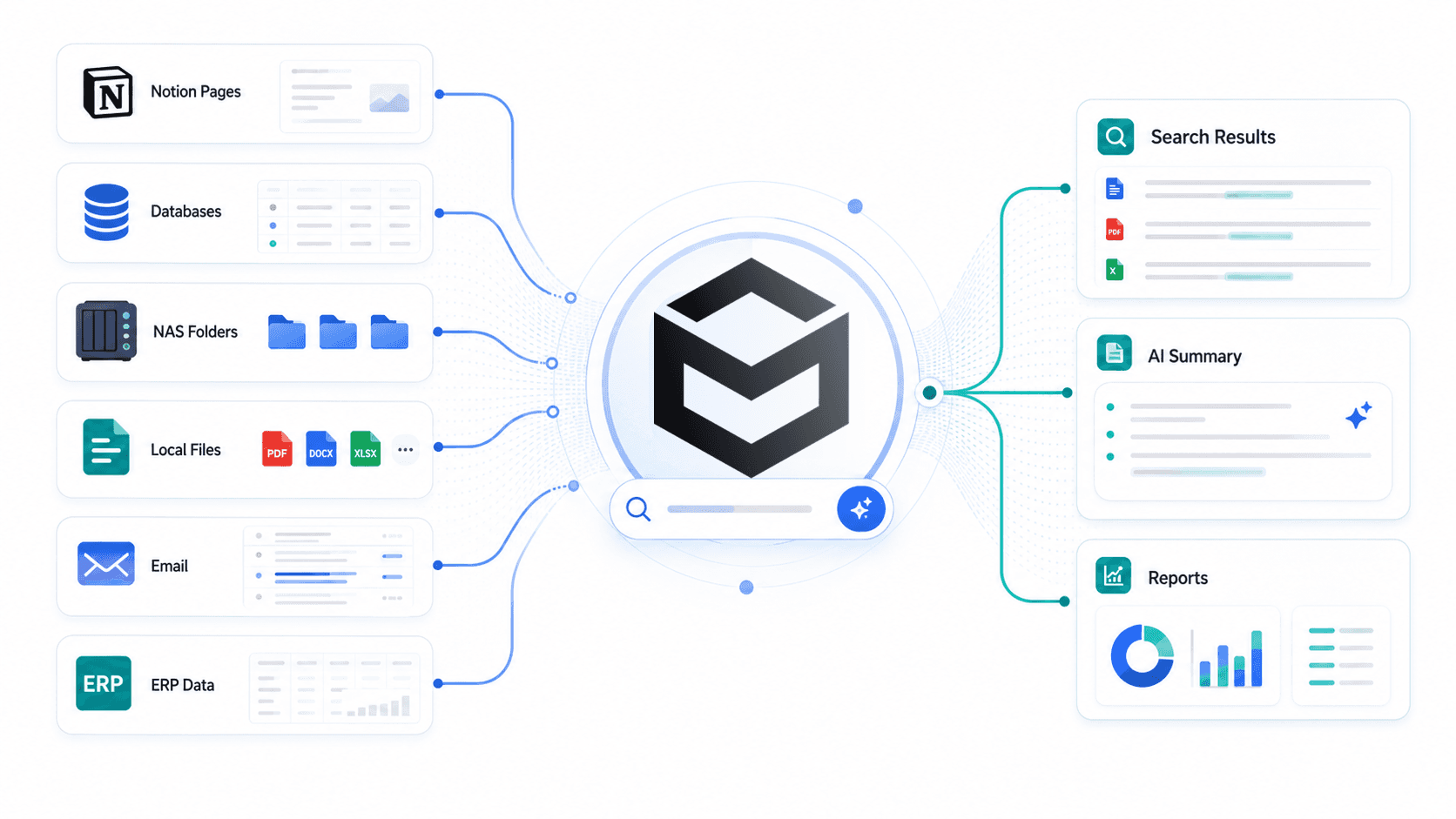
Wissly can help index Notion page content alongside local drives, NAS, email archives, and legacy systems, creating a unified enterprise AI search environment with permission-aware retrieval and downstream work output generation.
👉 Try Wissly Work AI for Free | Schedule a 1-on-1 Enterprise Demo
-
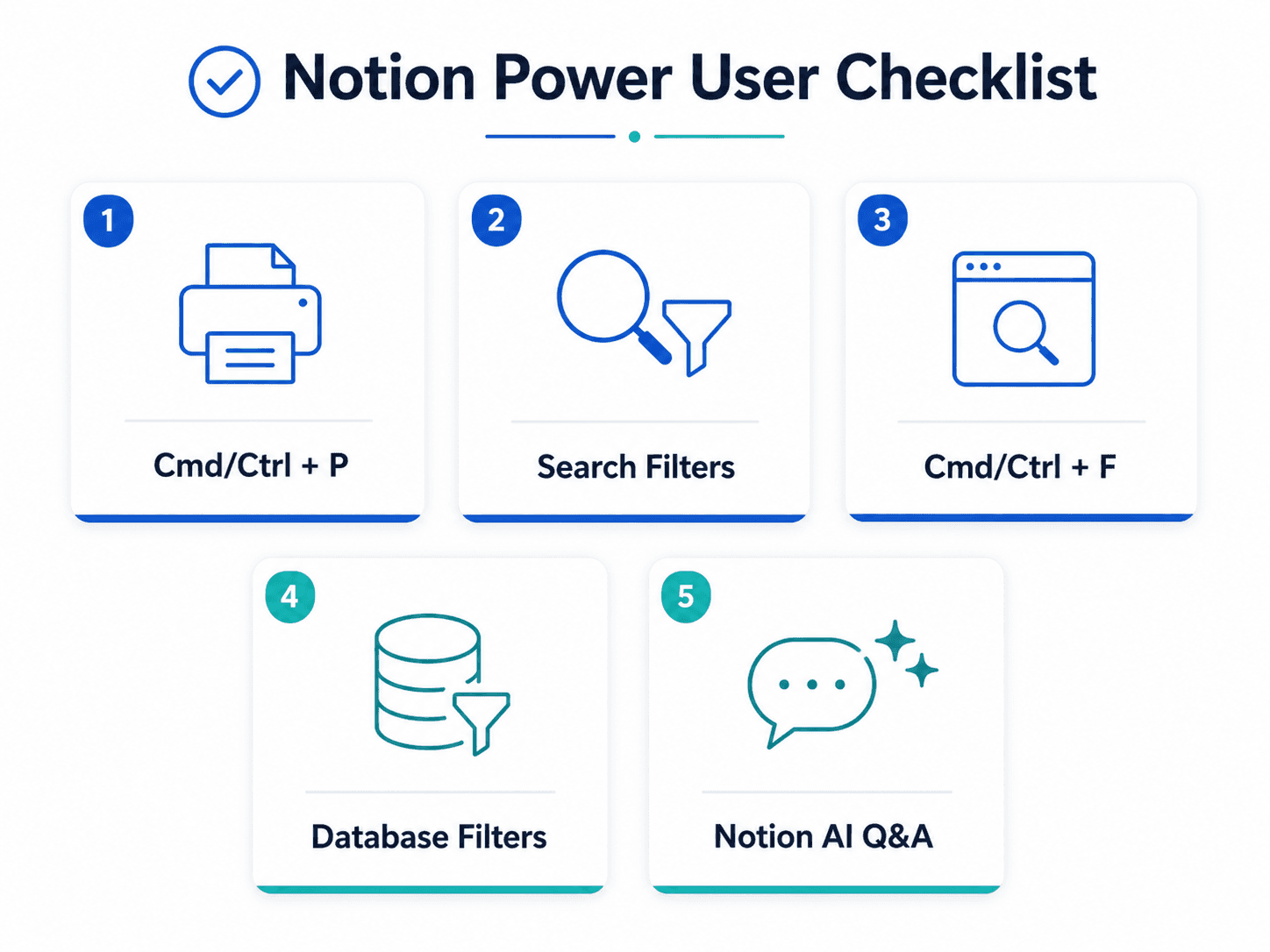
5 Native Notion Search Hacks You Should Master First
Before upgrading your enterprise tech stack, make sure your team is using Notion’s built-in navigation shortcuts and filters effectively.
2-1. Global Search Shortcut: Cmd/Ctrl + P or Cmd/Ctrl + K
Pressing Cmd + P on Mac or Ctrl + P on Windows opens the global workspace search modal.
Even without typing, it displays recently accessed pages, making it useful for quick navigation across frequently used docs, meeting notes, and project pages.
2-2. Search Filters: Title, Last Edited, and Author
When search results feel overwhelming, apply filters to narrow the scope.
-
Title-only search helps isolate key documents when a keyword appears too frequently in body text.
-
Last edited filters help remove outdated documentation and focus on recently updated pages.
-
Author filters are useful when tracking work created by a specific team member, department, or project owner.
2-3. In-Page Search: Cmd/Ctrl + F
Global search may get you to the right page, but Cmd/Ctrl + F helps you locate the exact keyword inside a long document.
This is especially useful for meeting minutes, PRDs, technical specifications, policy documents, and long project pages.
2-4. Database Search vs. Database Filters
The search input inside a Notion database view is useful for finding items within the current view.
For more precise retrieval, combine database search with native database filters.
For example:
Status = In Progress Tag = Q3 Marketing Owner = Growth Team
This is often more reliable than keyword search alone when working with structured project trackers or content calendars.
2-5. Natural Language Querying via Notion AI Q&A
When you cannot remember the exact phrasing, Notion AI Q&A can help with conversational questions.
For example:
“What was the approved Q2 budget for the performance marketing campaign?”
“What launch timeline did we agree on in the last product meeting?”
Availability and scope may vary depending on your Notion plan, workspace configuration, and admin security settings.
-
The Core Limitations of Native Notion Search in Enterprise Environments
Even when teams use shortcuts and filters properly, search friction can remain.
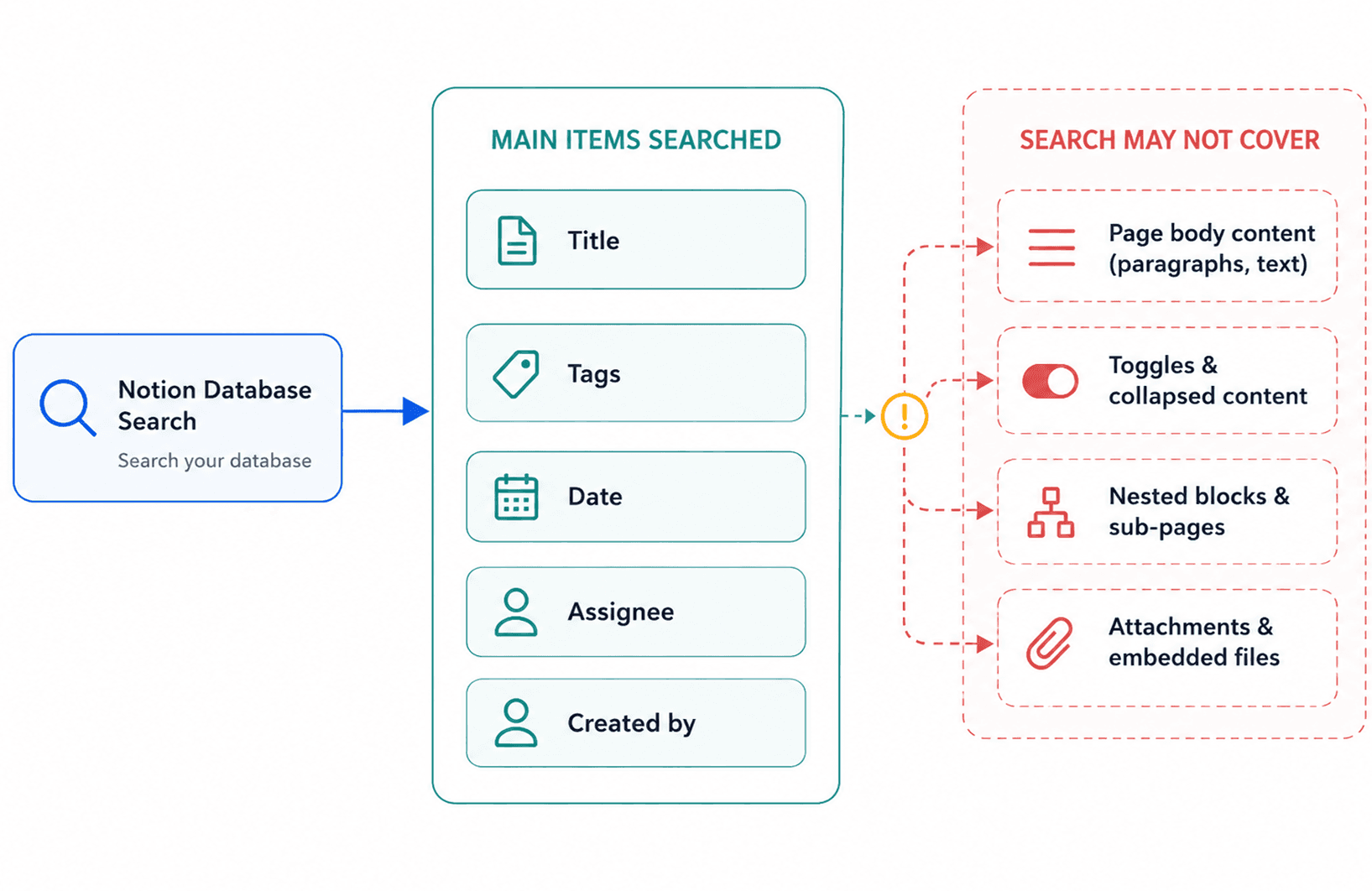
This is especially true when important knowledge is buried inside page bodies, toggles, sub-blocks, attachments, or external file repositories outside Notion.
<table><tbody><tr><td><p dir="ltr"><strong>Search Dimension</strong></p></td><td><p dir="ltr"><strong>Native Notion Search Experience</strong></p></td><td><p dir="ltr"><strong>Operational Impact on Enterprise Teams</strong></p></td></tr><tr><td><p dir="ltr">Indexing Depth</p></td><td><p dir="ltr">Often strongest on visible properties and page-level metadata</p></td><td><p dir="ltr">Deep text inside toggles, sub-blocks, PDF attachments, or embedded content may not surface as expected</p></td></tr><tr><td><p dir="ltr">Navigation</p></td><td><p dir="ltr">Global search can land users at the page level</p></td><td><p dir="ltr">Finding exact paragraphs inside long documents may still require manual in-page search</p></td></tr><tr><td><p dir="ltr">Cross-System Coverage</p></td><td><p dir="ltr">Primarily focused on the Notion workspace</p></td><td><p dir="ltr">External assets stored on NAS, Google Drive, local servers, email, or ERP systems may remain disconnected</p></td></tr></tbody></table>-
Solving the Search Gap: Unifying Notion and Company Data with Wissly Work AI
Wissly helps bridge the gap between structured Notion databases and fragmented corporate knowledge repositories.
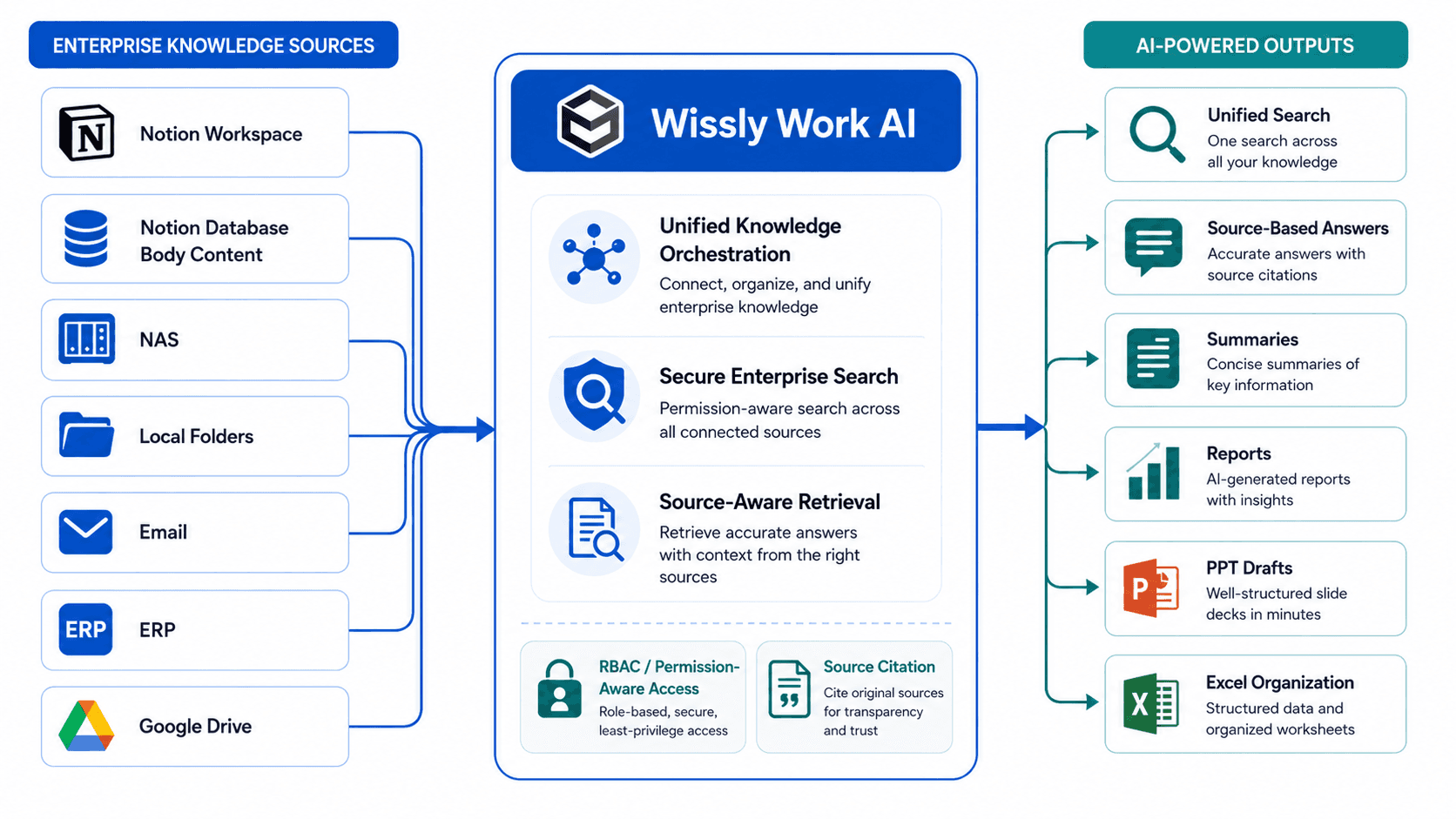
Instead of treating Notion as a standalone workspace, Wissly can connect Notion with internal file systems, NAS, local drives, email archives, and legacy business systems to support unified enterprise search.
4-1. Deep-Level Notion Body Indexing
Wissly can be configured to parse Notion page bodies, nested blocks, toggles, and custom templates as part of a searchable enterprise knowledge base.
This allows users to ask questions based on the actual content inside Notion pages, not only visible database properties or page titles.
Instead of opening page after page manually, teams can retrieve answers from the relevant page context with source references where supported by the integration setup.
4-2. Cross-Repository Search: Notion + NAS + Local Drives + ERP
Modern enterprise work rarely happens inside a single app.
Project plans may live in Notion, while final contracts are stored on NAS, customer approvals sit in email threads, and financial data remains inside ERP systems.
Wissly can connect these fragmented sources so teams can ask cross-system questions such as:
“Find the final vendor contract PDF stored on the company NAS that corresponds to Project Alpha mentioned in our Notion May Planning Doc.”
This helps teams move from app-by-app searching to context-aware enterprise knowledge retrieval.
4-3. Execution-Oriented Workflows: From Search to Output
Enterprise search is most valuable when it leads to actual work output.
Wissly can help transform search results and source documents into practical business deliverables, including:
-
Report drafts
-
Executive slide deck outlines
-
Structured Excel summaries
-
Internal briefing notes
-
Source-based decision summaries
This makes Wissly more than a document search layer. It becomes a Work AI environment for turning scattered knowledge into usable outputs.
-
Enterprise-Grade Security and Access Control
Connecting AI to scattered corporate drives requires careful governance.
Enterprise teams need more than search accuracy. They need permission control, data residency alignment, and deployment flexibility.
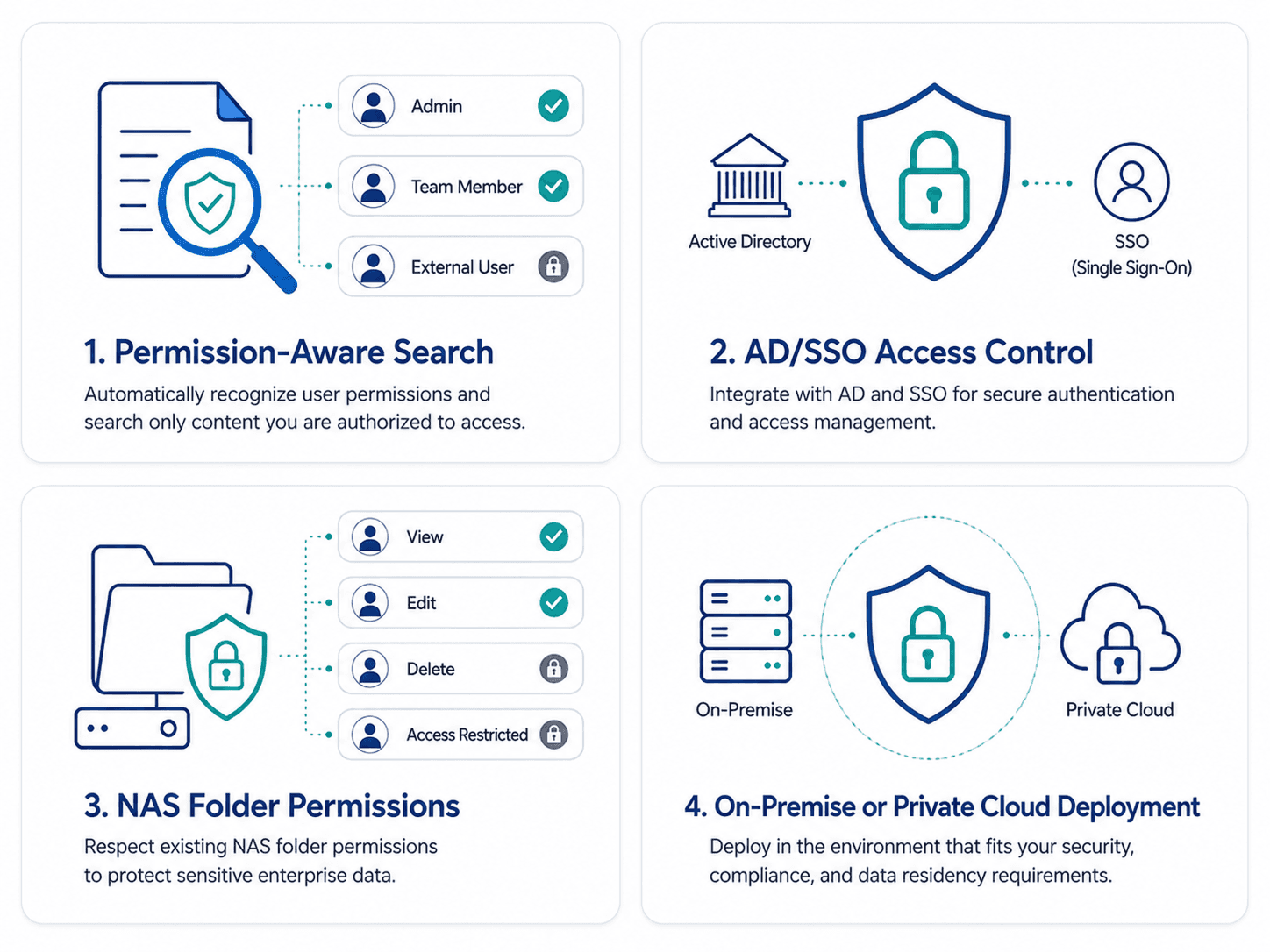
5-1. Permission-Aware Retrieval: RBAC, AD, SSO, and NAS Permissions
Wissly can be configured to reflect existing organizational permissions across systems such as Active Directory, SSO, NAS folder permissions, and Notion page-level access.
The goal is to help ensure users retrieve answers only from data they are authorized to access.
Actual permission behavior depends on the customer’s identity architecture, connected repositories, and deployment configuration.
5-2. Flexible Deployment: On-Premise, Private Cloud, or Hybrid Options
For organizations in finance, legal, healthcare, public sectors, manufacturing, or other regulated environments, deployment architecture matters.
Depending on security requirements, Wissly can support deployment models such as:
-
On-premise environments
-
Private cloud or VPC
-
Hybrid architectures
-
Restricted network environments
Wissly can be designed to prevent proprietary company data from being used for external model training, depending on deployment and configuration.
-
Frequently Asked Questions
-
Q1. Can we select specific Notion workspaces or databases for Wissly integration?
-
Yes. Wissly can support targeted indexing depending on the customer environment and security policy. Administrators can define indexing scope by workspace, database, parent page, or selected document source where supported by the integration configuration.
-
Q2. Does Wissly search inside PDF, Excel, and image attachments within Notion?
-
Depending on file type, scan quality, and integration scope, Wissly can support OCR and document parsing for attachments stored in Notion and connected file networks. This may include PDFs, Excel files, scanned documents, and other enterprise document formats, depending on the configured parsing pipeline.
-
Q3. How does Wissly differ from Notion AI Q&A?
-
Notion AI Q&A primarily operates within the Notion workspace experience. Wissly is designed for broader enterprise knowledge environments where important data may also live in NAS, local drives, ERP systems, email archives, Google Drive, SharePoint, or other internal repositories. It can also connect search results to downstream work outputs such as reports, executive slide outlines, and spreadsheet summaries.
-
Transform Scattered Data into Enterprise Intelligence
Notion is useful for organizing team knowledge, but enterprise data rarely lives in Notion alone.
Critical context often sits across local folders, NAS, cloud drives, email, ERP systems, and legacy repositories.
Wissly helps unify these sources into a permission-aware Work AI environment, enabling teams to search across fragmented knowledge and turn the results into practical business outputs.
👉 [Explore Wissly Notion & Enterprise Data Connectors →]👉 [Book a Custom Security & Work AI Consultation for Your Team →]


