
Insight
AI Document Search: Why Ctrl+F is Failing Your Enterprise

Your desk is buried under hundreds or thousands of pages of PDF reports and contracts. You hit Ctrl+F, but spend hours digging through 50+ search results to find real answers. The era of simple keyword search is over.
AI semantic search has become the new standard for document exploration. With Wissly, boost your work efficiency 10x or more. This article analyzes Ctrl+F limitations and presents how AI document search principles and practical applications can reclaim your time.
Ctrl+F Limitations in Real Work
Traditional Ctrl+F is a product of the desktop era. It reveals fatal weaknesses for legal, investment, and compliance professionals handling massive documents.
Q: Why can't Ctrl+F quickly find what you really need anymore?
2-1. Exact keyword matching only
Ctrl+F finds only exact text matches. Searching "liquidated damages" in contracts misses "indemnity liability" or "exculpatory clauses." Legal teams deal with varied contract language daily. Investment reports using "ROI" instead of "return rate" or "margin rate" cause analysts to miss key data. This leads compliance officers to overlook clauses with identical meanings, creating significant risk exposure.
2-2. Synonym ignorance and scanned document issues
The bigger problem is synonym blindness. Investment analysts searching for "cost reduction" strategies find nothing when documents use "expense optimization" or "operational efficiency." Moreover, 70%+ of corporate documents are scanned PDFs or image-based. Un-OCRed scanned contracts and handwritten regulation notes are completely unsearchable with Ctrl+F.
2-3. Context hunting in massive results
Ctrl+F spits out 100 results showing locations only. Legal staff spend 2-3 hours clicking through 100 pages to find "poison pills." Investment due diligence through 50 IR documents consumes entire days. This repetitive labor causes simple errors (missed risks) and eats high-value work time (strategic decisions).
AI Semantic Search Principles & Advantages
AI semantic search understands meaning and context. Instead of simple text matching, it uses natural language processing (NLP) and vector embeddings to analyze entire documents and generate intent-matched answers. Wissly implements all this with RAG technology.
3-1. Semantic understanding search method
Semantic search calculates similarity in vector space, not word surfaces. "Profitability" queries pull "margin rate," "profit margin," "ROI" contexts to extract optimal paragraphs. Scanned PDFs are auto-OCRed for searchability. Tables, charts, images are interpreted too—"What was 2025 growth rate from the sales trend graph?" gets numbers + page references.
Wissly: Keyword vs Semantic Comparison
Comparison Item | Ctrl+F (Keyword Search) | Wissly AI (Semantic Search) |
Search Method | Exact text matching | Context·intent·synonym understanding |
Result Format | Location list (human filtering needed) | Direct answer + summary + source highlight |
Synonym Support | Not possible | Yes (cost=expense=budget) |
Data Processed | Text only | OCR scans·tables·images·multilingual |
Speed (100 pages) | 5-30 minutes | 3-5 seconds |
Accuracy | 40-60% (human dependent) | 90%+ (context-based) |
Wissly indexes up to 4,000 documents at once without data leak concerns.
Real-World Applications: Legal, Investment, Compliance
AI document exploration isn't theory. Here are immediately applicable real-world cases.
Contract poison clause auto-detection
Legal team: "Find termination conditions and 3 liability risks in this contract"
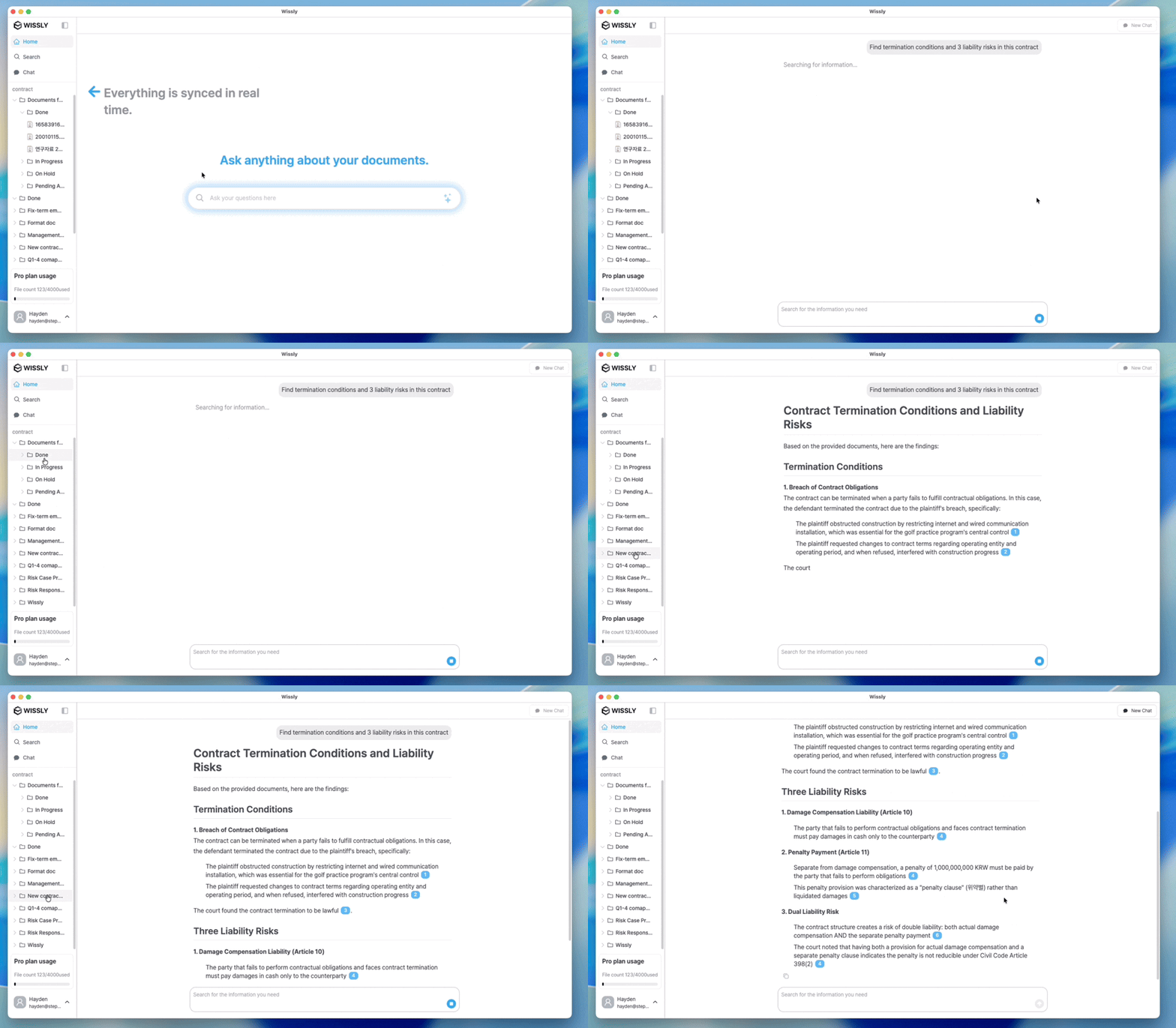
Wissly analyzes 120 pages to highlight page 45 (termination: 90-day notice), page 78 (indemnity: unlimited liability) + summary. Ctrl+F 2hrs → 10 seconds.
Compliance workflow acceleration
IT Security/Compliance: "Show GDPR violation case analyses"
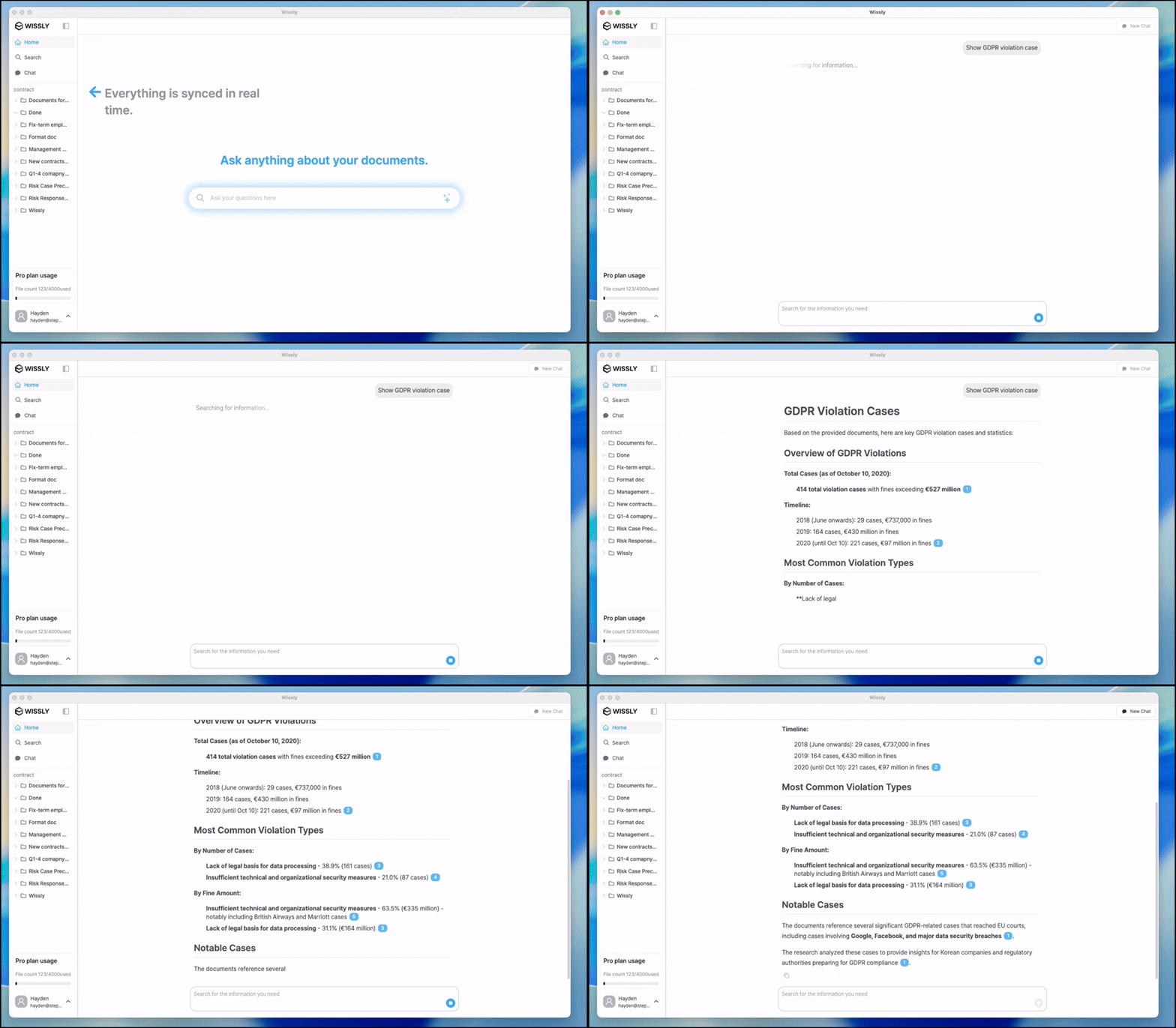
Hundreds of regulation docs semantically analyzed beyond keywords, auto-classified High/Medium/Low risk. Audit prep reports auto-generated, saving 100 hours annually.
Conclusion: End of Ctrl+F Era
Ctrl+F was convenient but unfit for high-info-density work. Switching to AI semantic search cuts research time 80% and errors 90%. Zero-Trust security, accurate data delivery, unlimited document processing. Try Wissly free now. One folder sync makes your AI colleague slash research time by 90%.
Recommended Content